1
Capture the spark
New song in one tap. Get the line down before it vanishes — clean editor, no clutter.
A songwriter’s notebook with a producer’s brain.
Capture lyrics the instant they hit, then tag every song with BPM, key, scale, and syllable counts — so ideas stay organized and ready to record. AI only when you ask. Your lyrics stay yours.
Placeholder quotes until real App Store reviews land — structure is ready to swap.
★★★★★“Finally a notes app that knows what BPM and syllables are. I write on the train and everything’s tagged before I hit the studio.”
Early tester Indie songwriter
★★★★★“The AI is there when I’m stuck — but it doesn’t own the song. My key, my lines, my catalog.”
Early tester Rap / R&B writer
★★★★★“Free and focused. No $13/month wall just to keep my verses in one place.”
Early tester Worship & pop
Four steps from the idea in your head to a song you can open tomorrow.
New song in one tap. Get the line down before it vanishes — clean editor, no clutter.
BPM, key, scale on every track so your catalog is searchable and session-ready.
Live syllable counts help the words sit on the beat. Build verses, hooks, and bridges.
Optional next-line ideas with direction, style, and tone — only when you ask, with your key.
Everything a writer needs to catch an idea and shape it into a song — in one focused, fast studio.
A clean canvas for verses, hooks, and bars — nothing between you and the line.
Tag each song with BPM, key, and scale. Live syllable counts help lock your flow.
Set direction, style, emphasis, and tone — then generate next-line ideas when you’re stuck.
Sort by folders, BPM, or date. Search your entire songbook instantly.
New song in a single tap — with undo/redo, filters, and a timeline of every idea.
From a one-line spark to a finished track, each song keeps its details and history.
Annotated looks at the three screens you’ll live in — not a feature dump, a writing flow.
Open catalog → drop into the editor → unstick with AI when a line stalls. Motion demo can replace this strip later; for now the path is clear.
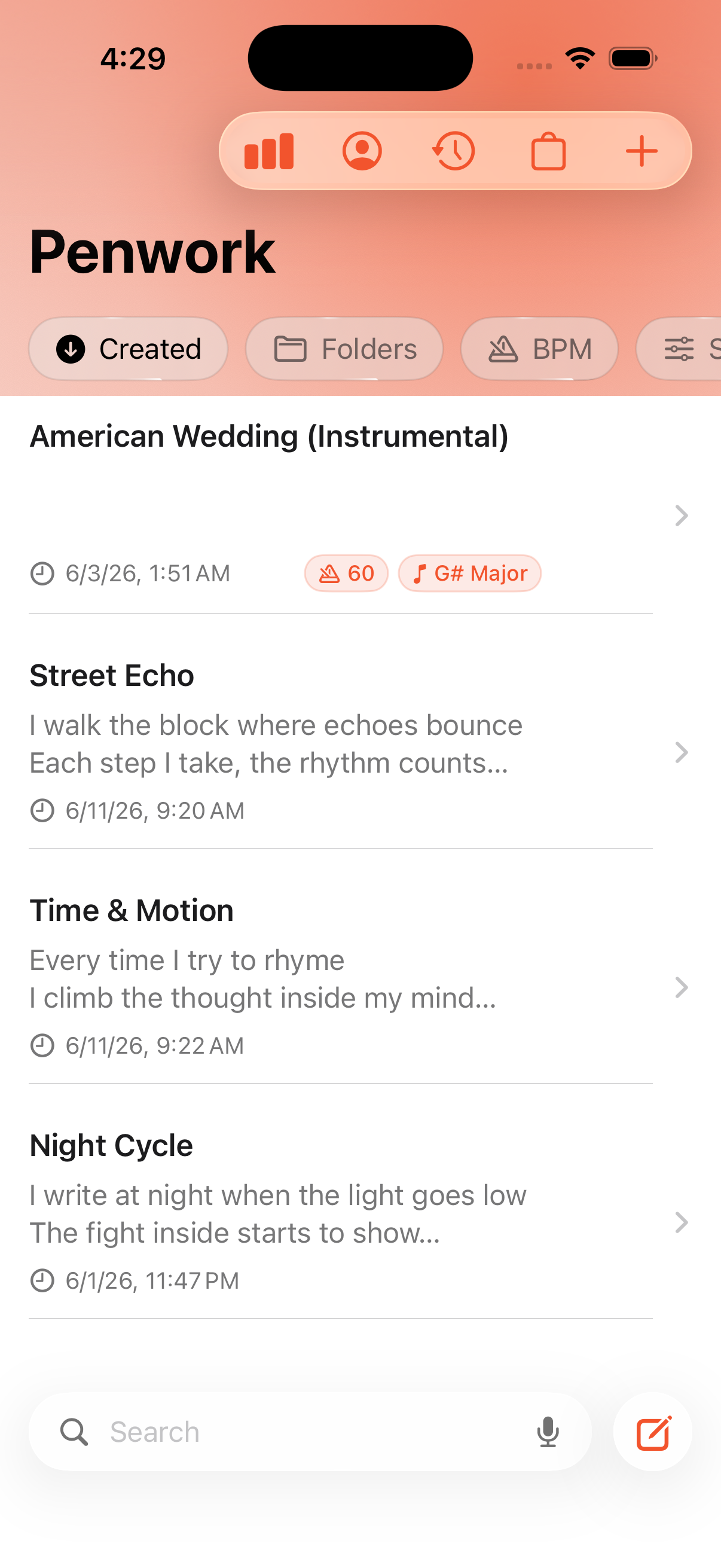
Every idea in one place — searchable, sortable, ready when the session starts.
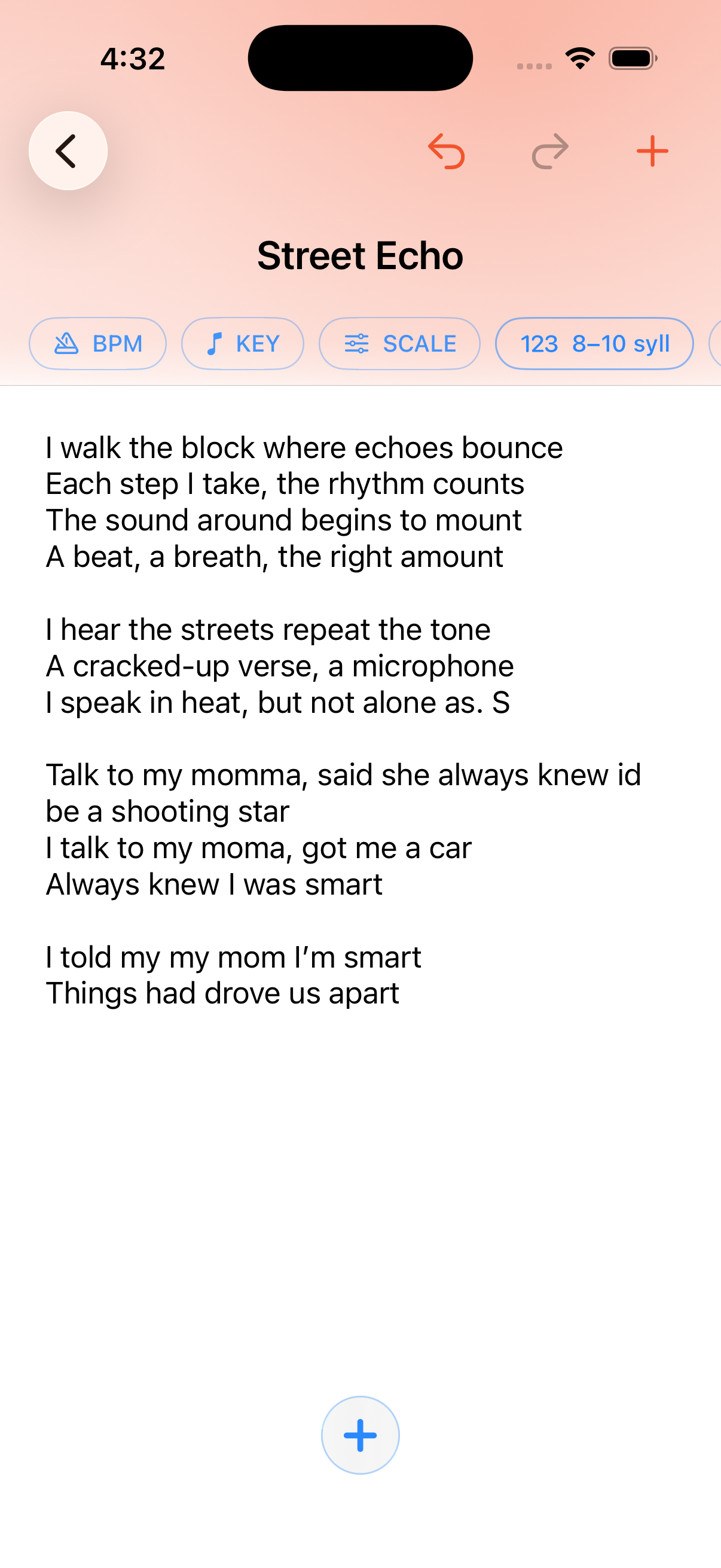
A distraction-free canvas for verses, hooks, and bars — with music-aware tools when you need them.
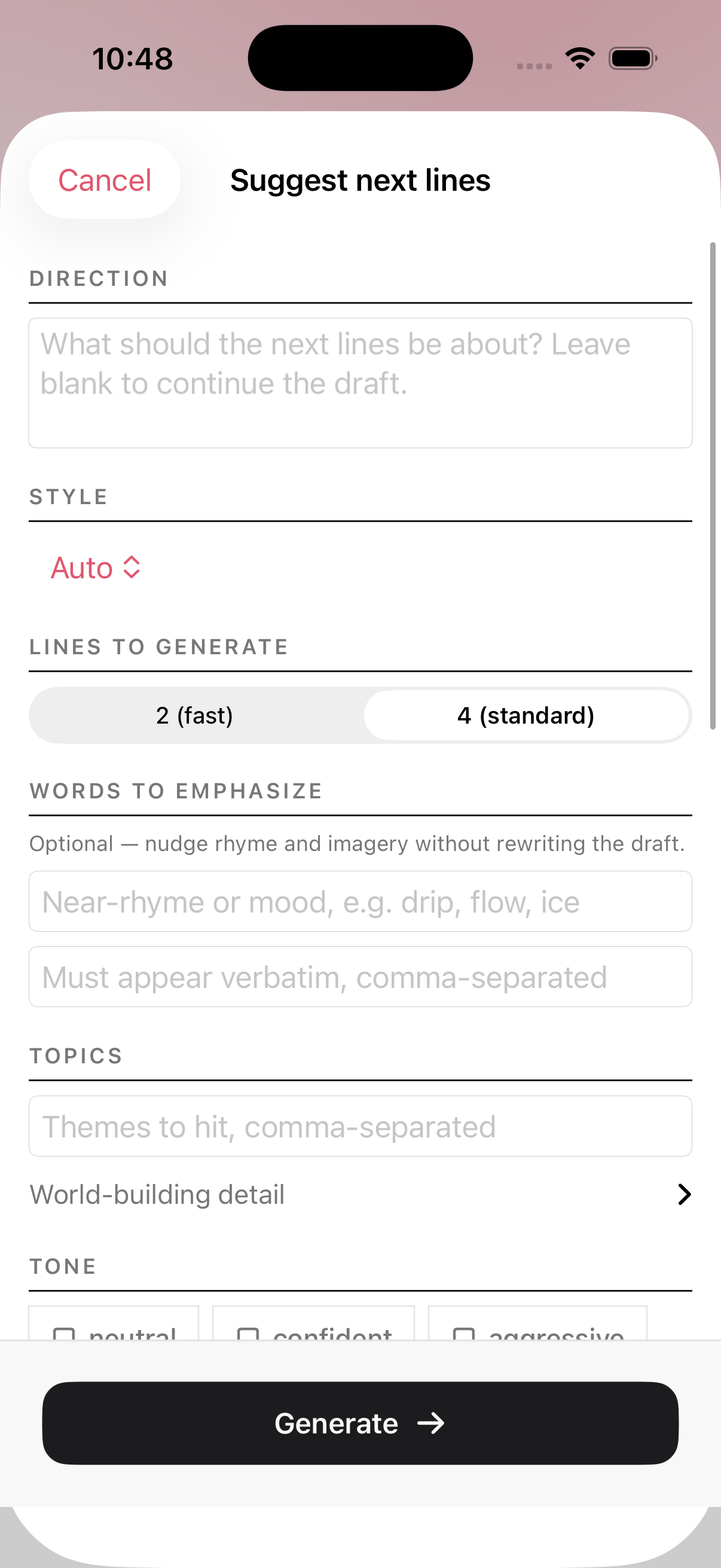
Set direction, style, words to emphasize, and tone. Generate next lines only when you want them.

Write on the phone in your pocket, spread out on iPad, or sit down at a Mac — same studio, same songs.
Pocket studio — capture lines the second they hit.
iPad — more room for long sessions, same universal app.
Mac — desk mode for deep writing sessions (universal App Store build).
Typical songwriting apps charge after a trial. Generic notes apps don’t know what a key signature is.
| What you get | Notes / Notion | Paid songwriting apps | Penwork Studio |
|---|---|---|---|
| Price for core writing | Free clutter | Often $3–13/mo after trial | Free on App Store |
| BPM · key · scale tags | No | Sometimes | Yes |
| Syllable awareness | No | Often yes | Yes |
| AI help | None / separate app | Usually behind subscription | Optional · BYO key |
| Your lyrics ownership | You own notes | Varies by product | Explicitly yours |
| Built as a song catalog | Generic folders | Yes | Yes · search & sort |
Competitors change pricing often — Penwork’s pitch is simple: write free, tag the music, AI only when you ask.
Craft first. Control first. No “we train on your verses” story.
Titles, verses, hooks, notes — your content stays yours. We don’t claim your songs or compositions.
Bring-your-own API key. Requests go from your device to your provider — not through a Harmony Stack middleman.
iPhone, iPad, and Mac. Write on the bus, at the desk, or in the booth — one catalog across your Apple devices.
Yes — free on the App Store for iPhone, iPad, and Mac. Download and start writing without a subscription wall for the core studio.
BPM, key, scale, syllable counts, titles, lyrics, and timestamps — so your catalog stays searchable and session-ready.
AI features are bring-your-own-key: you add a provider key on device, then requests go from your device to that provider. Harmony Stack doesn’t middleman your prompts. See Terms & Privacy for details.
You do. Your content stays yours. We don’t claim ownership of your songs or compositions.
iPhone, iPad, and Mac — one free App Store download for the Apple devices you write on. Universal app, same catalog and tools.
Harmony Stack — the same studio behind custom sites, Shopify, and apps like CDL One Stop. Support: harmonystack@gmail.com or (201) 745-7995.
Download free, catch the spark, tag the track, and keep every idea ready to record.
Free on iPhone, iPad & Mac · A Harmony Stack product
A Harmony Stack product
Need a website, Shopify store, or app built the same way?
Hire Harmony Stack →